
17 KiB
nvim-treesitter




The goal of nvim-treesitter is both to provide a simple and easy way to use the interface for tree-sitter in Neovim and to provide some basic functionality such as highlighting based on on it:
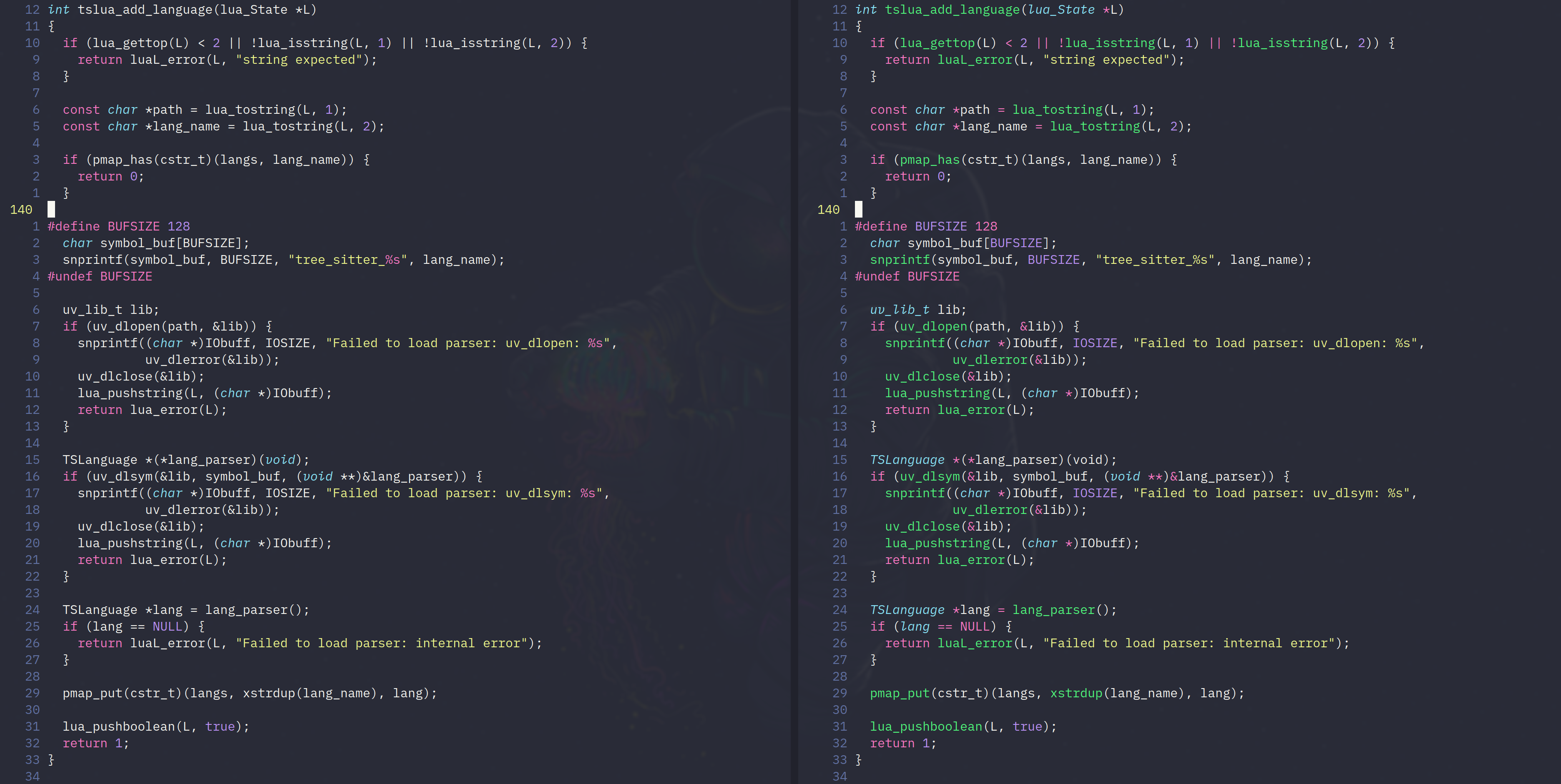
Traditional highlighting (left) vs Treesitter-based highlighting (right). More examples can be found in our gallery.
Warning: Treesitter and nvim-treesitter highlighting are an experimental feature of nightly versions of Neovim. Please consider the experience with this plug-in as experimental until Neovim 0.5 is released! You can find the current roadmap here. The roadmap and all features of this plugin are open to change, and any suggestion will be highly appreciated!
Nvim-treesitter is based on three interlocking features: language parsers, queries, and modules, where modules provide features -- such as highlighting -- based on queries for syntax objects specified by language parsers. Users will generally only need to interact with parsers and modules as explained in the next section. For more detailed information on setting these up, see "Advanced setup".
Quickstart
Requirements
- Neovim nightly
tarandcurlin your path (or alternativlygit)- A C compiler in your path and libstdc++ installed (Windows users please read this!).
Installation
You can install nvim-treesitter with your favorite package manager (or using the native package feature of vim, see :h packages).
E.g., if you are using vim-plug, put this in your init.vim file:
Plug 'nvim-treesitter/nvim-treesitter'
Language parsers
Treesitter uses a different parser for every language, which needs to be generated via tree-sitter-cli from a grammar.js file, then compiled to a .so library that needs to be placed in neovim's runtimepath (typically under parser/{lang}.so). To simplify this, nvim-treesitter
provides commands to automate this process. If the language is already supported by nvim-treesitter, you can install it with
:TSInstall {language}
This command supports tab expansion. You can also get a list of all available languages and their installation status with :TSInstallInfo. Parsers not on this list can be added manually by following the steps described under "Adding unsupported parsers" below.
If you update nvim-treesitter and want to make sure the parser is at the latest compatible version (as specified in nvim-treesitter's lockfile.json), use :TSUpdate {language}. To update all parsers unconditionally, use :TSUpdate all or just :TSUpdate.
Modules
Each modules provide a distinct feature based on treesitter such as highlighting, indentation, or folding; see :h nvim-treesitter-modules or see "Modules" below for a list of available modules and their options.
All modules are disabled by default and need to be activated explicitly in your init.vim:
lua <<EOF
require'nvim-treesitter.configs'.setup {
  ensure_installed = "maintained", -- one of "all", "maintained" (parsers with maintainers), or a list of languages
  highlight = {
    enable = true,              -- false will disable the whole extension
    disable = { "c", "rust" },  -- list of language that will be disabled
  },
}
EOF
Each module can also be enabled or disabled interactively through the following commands:
:TSBufEnable {module} " enable module on current buffer
:TSBufDisable {module} " disable module on current buffer
:TSEnableAll {module} [{ft}] " enable module on every buffer. If filetype is specified, enable only for this filetype.
:TSDisableAll {module} [{ft}] " disable module on every buffer. If filetype is specified, disable only for this filetype.
:TSModuleInfo [{module}] " list information about modules state for each filetype
Check :h nvim-treesitter-commands for a list of all available commands. It may be necessary to reload the buffer (e.g., via :e) after enabling a module.
Supported languages
For nvim-treesitter to support a specific feature for a specific language requires both a parser for this language and an appropriate query file for that language and that feature.
The following is a list of languages for which a parser can be installed through :TSInstall; a checked box means that nvim-treesitter also contains queries at least for the highlight module.
We are looking for maintainers to add more parsers and to write query files for their languages.
- bash (maintained by @TravonteD)
- c (maintained by @vigoux)
- c_sharp (maintained by @svermeulen)
- clojure (maintained by @sogaiu)
- cpp (maintained by @theHamsta)
- css (maintained by @TravonteD)
- dart (maintained by @Akin909)
- elm
- fennel (maintained by @TravonteD)
- go (maintained by @theHamsta, @WinWisely268)
- haskell
- html (maintained by @TravonteD)
- java (maintained by @p00f)
- javascript (maintained by @steelsojka)
- jsdoc (maintained by @steelsojka)
- json (maintained by @steelsojka)
- julia
- lua (maintained by @vigoux)
- nix (maintained by @leo60228)
- ocaml (maintained by @undu)
- ocaml_interface (maintained by @undu)
- ocamllex (maintained by @undu)
- php (maintained by @tk-shirasaka)
- python (maintained by @stsewd, @theHamsta)
- ql (maintained by @pwntester)
- Tree-sitter query language (maintained by @steelsojka)
- regex (maintained by @theHamsta)
- rst (maintained by @stsewd)
- ruby (maintained by @TravonteD)
- rust (maintained by @vigoux)
- scala
- swift
- teal (maintained by @euclidianAce)
- toml (maintained by @tk-shirasaka)
- tsx
- typescript (maintained by @steelsojka)
- verilog (maintained by @zegervdv)
- vue
- yaml
Available modules
Modules provide the top-level features of nvim-treesitter. These can be implemented either as part of nvim-treesitter or as an external plugin.
Included modules
The following is a list of modules included in nvim-treesitter. Note that not all modules work for all languages (depending on the queries available for them).
Highlight
Consistent syntax highlighting.
lua <<EOF
require'nvim-treesitter.configs'.setup {
  highlight = {
    enable = true,
    custom_captures = {
      -- Highlight the @foo.bar capture group with the "Identifier" highlight group.
      ["foo.bar"] = "Identifier",
    },
  },
}
EOF
Incremental selection
Incremental selection based on the named nodes from the grammar.
lua <<EOF
require'nvim-treesitter.configs'.setup {
  incremental_selection = {
    enable = true,
    keymaps = {
      init_selection = "gnn",
      node_incremental = "grn",
      scope_incremental = "grc",
      node_decremental = "grm",
    },
  },
}
EOF
Indentation
Treesitter based indentation (= vim behavior)
lua <<EOF
require'nvim-treesitter.config'.setup {
  indent = {
    enable = true
  }
}
EOF
Folding
set foldmethod=expr
set foldexpr=nvim_treesitter#foldexpr()
This will respect your foldnestmax setting.
External modules
Other modules can be installed as plugins, such as
- refactor - Refactoring and definition modules
- textobjects - Textobjects defined by tree-sitter queries
- playground - Treesitter integrated playground
- context - Show parent code context in a popover
Advanced setup
Adding parsers
If you have a parser that is not on this list (either from a repository on Github or a local directory), you can add it manually for use by nvim-treesitter as follows:
- Clone the repository or create a new project in, say,
~/projects/tree-sitter-zimbu. Make sure that thetree-sitter-cliexecutable is installed and in your path; see https://tree-sitter.github.io/tree-sitter/creating-parsers#installation for installation instructions. - Run
tree-sitter generatein this directory (followed bytree-sitter testfor good measure). - Add the following snippet to your
init.vim:
lua <<EOF
local parser_config = require "nvim-treesitter.parsers".get_parser_configs()
parser_config.zimbu = {
  install_info = {
    url = "~/projects/tree-sitter-zimbu", -- local path or git repo
    files = {"src/parser.c"}
  },
  filetype = "zu", -- if filetype does not agrees with parser name
  used_by = {"bar", "baz"} -- additional filetypes that use this parser
}
EOF
- Start
nvimand:TSInstall zimbu.
You can also skip step 2 and use :TSInstallFromGrammar zimbu to install straight from grammar.js. Once the parser is installed, you can update it (from the latest revision of the main branch if url is a Github repository) with :TSUpdate zimbu.
Adding queries
Queries are what nvim-treesitter uses to extract informations from the syntax tree; they are
located in the queries/{language}/* runtime directories (like the queries folder of this plugin), e.g., queries/{language}/{locals,highlights,textobjects}.scm. Other modules may require additional queries such as folding.scm.
nvim-treesitter considers queries as any runtime file (see :h rtp), that is :
- if the file is in any
after/queries/folder, then it will be used to extend the already defined queries. - Otherwise, it will be used as a base to define the query, the first query found (with the highest priority) will be the only one to be used.
This hybrid approach is the most standard way; in this case
- if you want to rewrite (or write) a query, don't use
after/queries; - if you want to override a part of a query (only one match for example), use the
after/queriesdirectory.
Adding modules
If you wish you write your own module, you need to support
- tree-sitter language detection support;
- attaching and detaching to buffers;
- all nvim-treesitter commands.
At the top level, you can use the define_modules function to define one or more modules or module groups:
lua <<EOF
require'nvim-treesitter'.define_modules {
  my_cool_plugin = {
    attach = function(bufnr, lang)
      -- Do cool stuff here
    end,
    detach = function(bufnr)
      -- Undo cool stuff here
    end,
    is_supported = function(lang)
      -- Check if the language is supported
    end
  }
}
EOF
with the following properties
module_path: A require path (string) that exports a module with anattachanddetachfunction. This is not required if the functions are on this definition.enable: Determines if the module is enabled by default. This is usually overridden by the user.disable: A list of languages that this module is disabled for. This is usually overridden by the user.is_supported: A function that takes a language and determines if this module supports that language.attach: A function that attaches to a buffer. This is required ifmodule_pathis not provided.detach: A function that detaches from a buffer. This is required ifmodule_pathis not provided.
Extra features
Statusline indicator
echo nvim_treesitter#statusline(90)  " 90 can be any length
module->expression_statement->call->identifier
Utilities
You can get some utility functions with
local ts_utils = require 'nvim-treesitter.ts_utils'
Check :h nvim-treesitter-utils for more information.
Troubleshooting
Before doing anything make sure you have the latest version of this plugin and run :checkhealth nvim_treesitter. It can also help to update the parsers via :TSUpdate.
This will help you find where the bug might come from.
- Feature
Xdoes not work for{language}...
First, check the ## {language} parser healthcheck section of :checkhealth if you have any warning.
If you do, it's highly possible that this is the cause of the problem.
If everything is okay, then it might be an actual error.
In both cases, feel free to open an issue here.
- I get
module 'vim.treesitter.query' not found
Make sure you have the latest nightly version of Neovim.
- I get
Error detected while processing .../plugin/nvim-treesitter.vimevery time I open Neovim
This is probably due to a change in a parser's grammar or its queries.
Try updating the parser that you suspect has changed (:TSUpdate {language}) or all of them (:TSUpdate).
If the error persists after updating all parsers,
please open an issue.
- I experience weird highlighting issues similar to #78
This is a well known issue, which arise when the tree and the buffer are getting out of sync. As this issue comes from upstream, we don't have any finite fix. To get around this, you can force reparsing the buffer with this command:
:write | edit | TSBufEnable highlight
This will save, restore and enable highlighting for the current buffer, fixing the issue.
- I experience bugs when using
nvim-treesitter'sfoldexprsimilar to #194
This might happen, and is known to happen with vim-clap, to avoid those kind of errors, please use
setlocal instead of set for the appropriate filetypes.